

Are you a new WordPress user, blogger, or small business owner wondering how to get your website seen by Google? You’ve chosen the world’s most popular Content Management System (CMS), which is a fantastic start! But simply having a WordPress site isn’t enough to secure a top spot on the search results page. That’s where WordPress SEO comes in.
In 2025, search engine optimization (SEO) is more critical and dynamic than ever. It’s no longer just about stuffing keywords into your text. Today, winning on Google is about understanding AI-driven search, matching user intent, and ensuring seamless accessibility for every visitor.
This comprehensive guide is your practical, step-by-step roadmap to mastering WordPress SEO for beginners this year. We’ll break down the essential steps, from choosing the right theme to leveraging the latest in AI search, to help you significantly improve your visibility, attract high-quality organic traffic, and secure higher rankings on Google.
Our Goal is to make complex SEO strategies clear, practical, and actionable for you. By the end of this guide, you’ll know exactly how to do WordPress SEO and set your site up for long-term success.
Table of Contents
What is SEO in Simple Terms?
SEO, or Search Engine Optimization, is the practice of making changes to your website design and content so that it appears higher up in the organic, non-paid results section of search engines like Google. Think of it this way: when someone types a query into Google, the search engine has to choose the absolute best answer from billions of pages.
SEO is your way of sending strong signals that your page is the most relevant, trustworthy, and high-quality result.
How Does WordPress Help with SEO Out of the Box?
One of the main reasons WordPress powers over 40% of the internet is its inherent SEO friendliness. Right from the installation, WordPress is built with clean code and features that Google likes:
- Clean Codebase: WordPress’s core is structured logically, making it easy for Google’s crawlers to read and index your content.
- Permalinks: It allows you to easily create SEO-friendly URL structures, like
yoursite.com/your-article-topic, instead of cryptic URLs likeyoursite.com/?p=101. - Content Management: It provides an easy interface to manage titles, headings, and images—all critical components of on-page SEO.
However, a default WordPress installation is only a starting point. To truly dominate the search rankings, you still need to implement best SEO practices for WordPress by adding plugins, optimizing your content, and fine-tuning technical settings.
The AI Shift: Google’s Algorithms and SGE in 2025
The single biggest change in the 2025 SEO landscape is the increasing influence of AI. Google’s algorithms are smarter and more human-like than ever before, focusing intensely on:
- Experience, Expertise, Authoritativeness, and Trustworthiness (E-E-A-T): Google is prioritizing content written by people with real-world experience.
- User Intent: They are much better at understanding the reason behind a search, not just the keywords used.
- Search Generative Experience (SGE): Google is actively rolling out SGE, an AI-powered feature that generates quick, summary answers at the top of the search results (often above the traditional #1 organic link).
This is why WordPress SEO optimization 2025 needs to go beyond simple keyword checks. You must now focus on creating authoritative content that directly answers user questions and provides exceptional value, a practice known as Answer Engine Optimization (AEO), which we’ll cover later.
Setting Up the Basics for WordPress SEO
Before you write your next post, you need to lay a rock-solid foundation for your site. These initial steps ensure Google can find, crawl, and understand your content efficiently.
Step 1: Choose an SEO-Friendly Theme
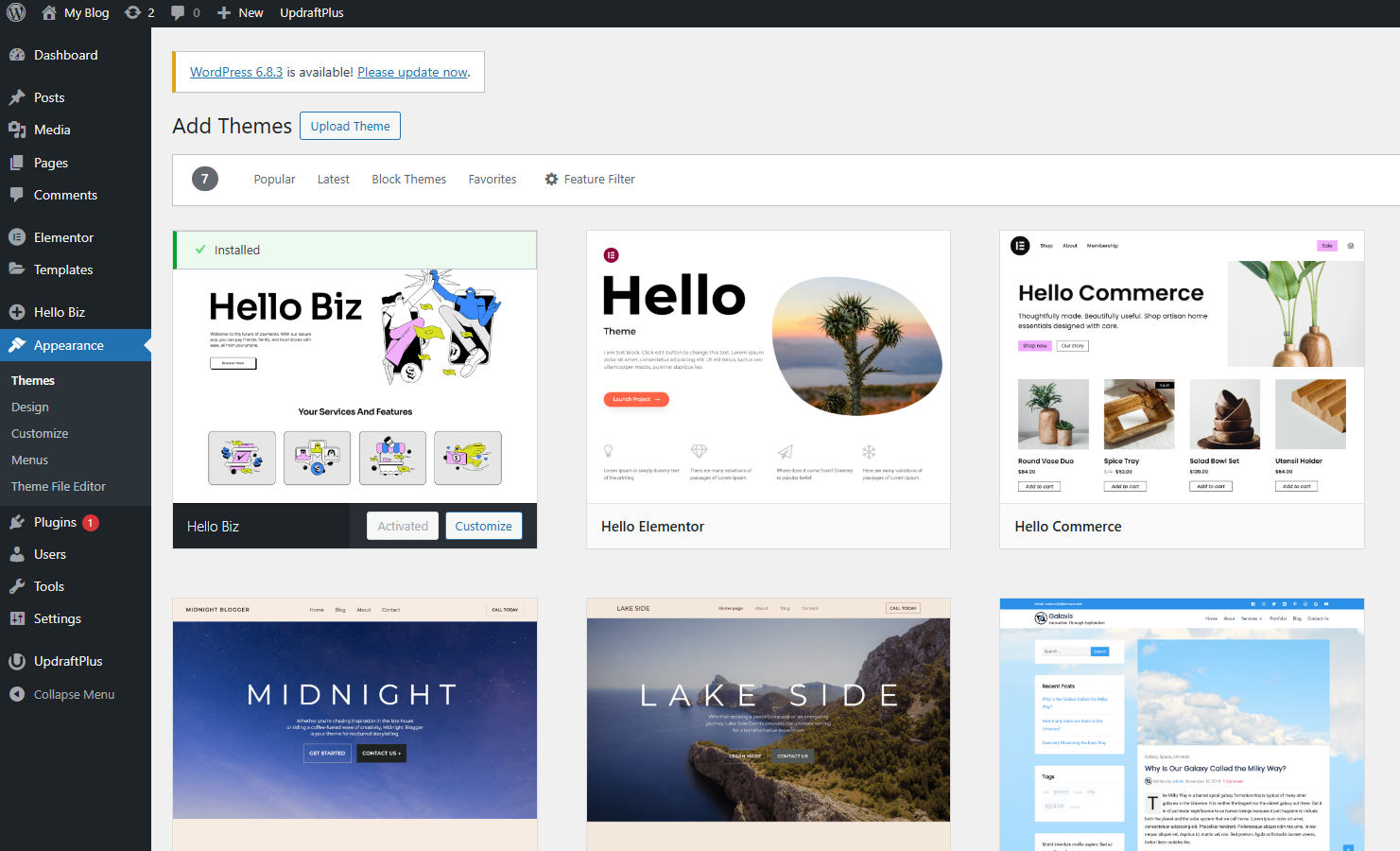
Your theme is the DNA of your website. A beautiful theme that is slow to load is an SEO disaster. Google prioritizes speed and mobile experience above almost everything else.
What makes a theme SEO-friendly?
- Speed and Lightweight: It uses minimal code and external resources, allowing pages to load in under 2 seconds. Look for themes built for performance, like Astra, GeneratePress, or Kadence.
- Mobile-Responsive: The theme must look and function perfectly on all screen sizes (phones, tablets, and desktops). Google uses mobile-first indexing, meaning it primarily judges your site based on its mobile version.
- Accessibility: It follows modern web standards and accessibility guidelines, which is a growing ranking factor.
If you are currently choosing your site’s look, dive into our detailed guide: 👉 How to Choose the Perfect WordPress Theme for Your Business in 2025
Step 2: Install an Essential SEO Plugin
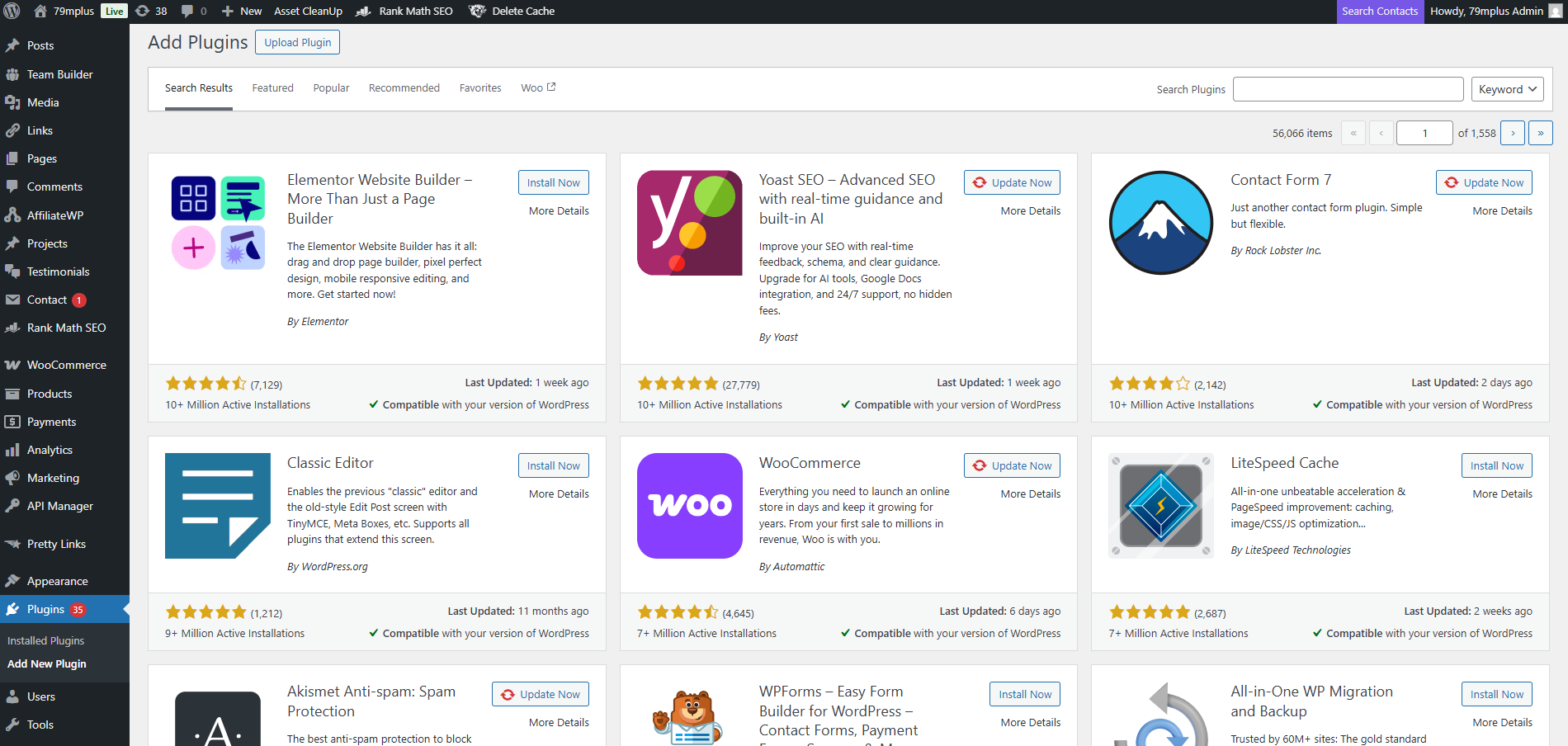
While WordPress is SEO-friendly, an SEO plugin is the control panel that lets you fine-tune the hundreds of necessary settings without touching any code. They are mandatory for any site looking to improve WordPress ranking.
Top 3 WordPress SEO Plugins: The 2025 Comparison
| Feature/Criteria | Yoast SEO | Rank Math | All in One SEO (AIOSEO) |
| Best For | Absolute beginners; Content/Readability Focus | Feature hunters; Multiple sites; Value in Free Tier | Local SEO; eCommerce (WooCommerce); Easiest Setup |
| Focus Keywords (Free) | 1 keyword per page/post | Up to 5 keywords/synonyms | 1 keyword per page/post |
| Content Score System | Traffic Light (Red/Orange/Green) | Numerical Score (0–100) | TruSEO Score & Actionable Checklist |
| Readability Analysis | Strong, separate score (Flesch Score, etc.) | Basic, often lumped into overall SEO score | Strong, actionable analysis |
| Redirection Manager (301s) | Only available in Premium | Included in the Free version | Included in Premium (most redirects) |
| 404 Error Monitor | Not included | Included in the Free version | Included in Premium |
| Schema Markup (Free) | Basic, reliable (Article, WebPage) | Extensive, built-in (FAQ, HowTo, Video, Local) | Basic, but extensive types in Premium |
| Local SEO Features | Requires expensive Premium Add-on | Requires Premium | Built-in Premium features are highly rated |
| AI Content Tools | Available via Premium add-on | Available via Content AI (Paid Credits) | Built-in AI Assistant (Paid) |
These tools automatically handle technical tasks like generating an XML Sitemap, adding schema markup (structured data), and giving you a simple interface to optimize your meta titles and descriptions for every page and post.
For a full breakdown of the top tools you need to succeed in 2025, check out: 👉 Top 10 Must-Have WordPress Plugins for 2025 (Speed, SEO, Security & More)
Step 3: Set Up Google Search Console & Analytics
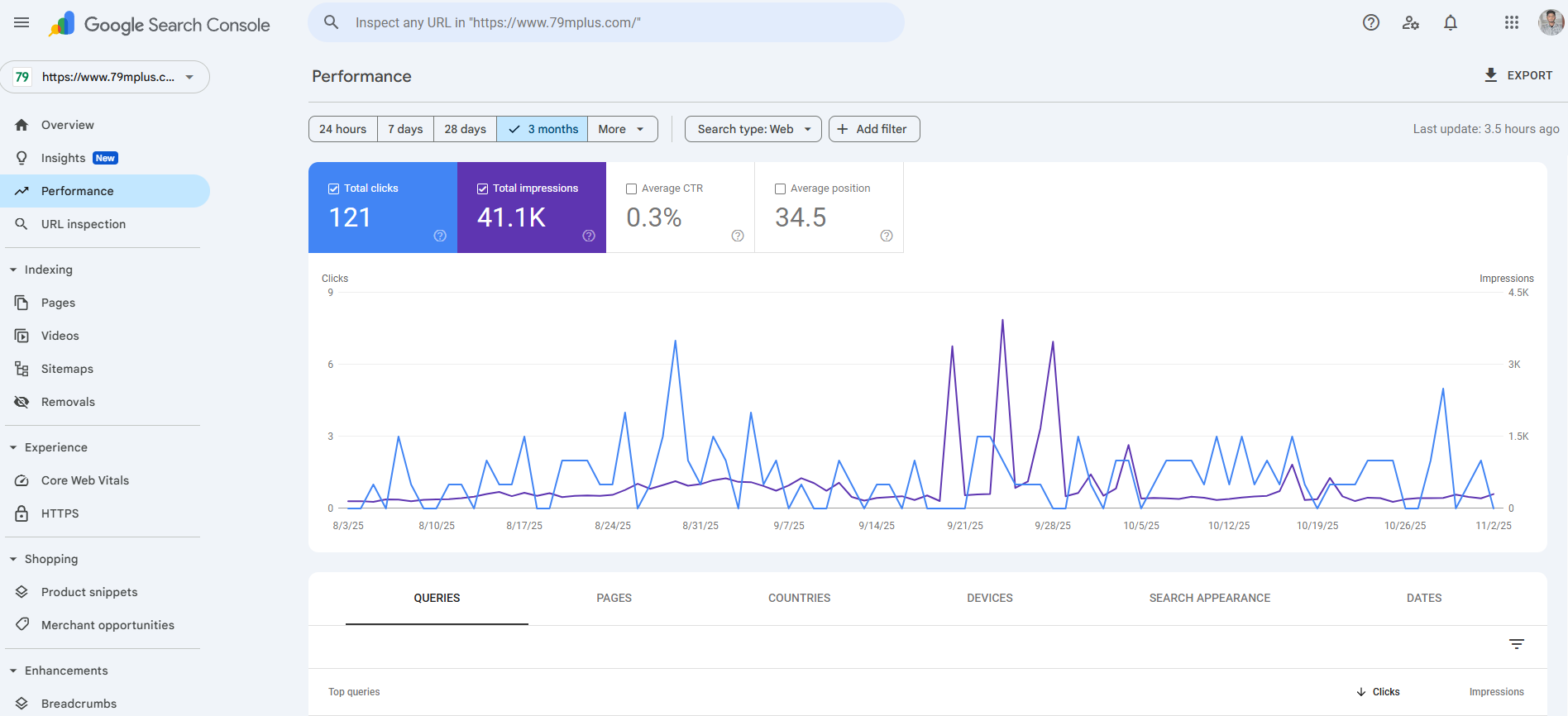
These are the two non-negotiable, free tools provided by Google that act as your site’s health monitor and performance tracker.
Google Search Console (GSC)
GSC is the direct line of communication between your website and Google.
- What it does: It tells you exactly how Google sees your site. You can submit your XML sitemap, check for indexing problems (pages Google can’t crawl), see which keywords you are ranking for (and your average position), and receive alerts about security or technical issues.
- Brief Setup: Sign up with your Google account, verify your domain ownership (often through your SEO plugin or domain provider), and then submit your sitemap (generated in Step 2).
Google Analytics (GA4)
GA4 (the newest version) tracks visitor behavior once they are on your site.
- What it does: It shows you what people do after they click your link. You can track traffic sources (organic, social, paid), identify your most popular pages, measure time-on-page and bounce rate, and understand audience demographics. This data is crucial for refining your content strategy.
- Brief Setup: Create a GA4 property, get the tracking code (or measurement ID), and easily connect it to your WordPress site using a plugin like Site Kit by Google, or the integration built into your SEO plugin.
Note: A high volume of organic traffic in Analytics with poor rankings reported in Search Console might indicate a technical issue, while great rankings in GSC with low traffic in Analytics might signal a poor click-through rate (CTR) on your search snippets.
Step 4. On-Page SEO Best Practices
On-Page SEO refers to the optimizations you make directly on your page or post to help Google understand the content and its relevance to search queries. This is the heart of how to do SEO on WordPress.
1. Write SEO-Friendly Titles
Your title (the H1 tag and the title tag seen in search results) is the single most important on-page element. It must attract the click and signal relevance to Google.
- Rule 1: Focus Keyword First. Always place your primary keyword as close to the beginning of the title as possible.
- Rule 2: Match Intent. The title should clearly state what the reader will gain (e.g., “guide,” “tips,” “how-to,” “list”).
- Rule 3: Use Numbers and Dates. Using the current year (like 2025) or a list number (e.g., “10 Best Ways”) significantly increases your Click-Through Rate (CTR).
| ❌ Bad Title Example | ✅ Optimized Title Example |
| My article is about getting better search traffic on WordPress. | WordPress SEO Guide 2025: 10 Proven Tips to Boost Organic Traffic |
| Website security tools. | 9 Best WordPress Security Plugins and Tips for 2025 |
2. Use Short, Keyword-Rich URLs (Slug Optimization)
The URL (or slug) should be clean, short, and contain your main focus keyword.
- Keep it brief: Google prefers URLs that are easy to read and share.
- Use your primary keyword: Ensure the slug matches the content’s topic.
- Avoid stop words: Remove unnecessary words like “a,” “the,” “is,” and “and.”
Example:
❌ Bad URL:
yoursite.com/2025/january/a-very-long-article-about-the-best-wordpress-seo-optimization-tips✅ Optimized URL:
yoursite.com/wordpress-seo-optimization-2025
3. Implement Proper Heading Hierarchy (H1, H2, H3)
Headings structure your content for readability and SEO. They act like an outline, helping both users and crawlers quickly understand your article’s main points.
- H1 (The Title): Use only one H1 per page. This is usually your main blog post title.
- H2 (Main Sections): Use H2 tags for the major sections of your article (like the numbered sections in this guide).
- H3 and H4 (Subsections): Use H3s to break down H2 sections, making the content easy to scan. Use H4s for minor details or lists within H3s.
Crucial Tip: Naturally weave your secondary keywords and related phrases into your H2 and H3 headings.
4. Optimize Meta Titles and Descriptions
While WordPress uses your post title as the default meta title, your SEO plugin allows you to customize both the Meta Title and Meta Description—the snippet users see on the Google search results page.
- Meta Title: Keep it under 60 characters. Include your primary keyword and a strong call-to-action (CTA) word (e.g., “Master,” “Learn,” “Guide”).
- Meta Description: Keep it under 155 characters. This is your chance to sell the click. Use a compelling, benefit-driven summary and include your primary or a strong secondary keyword.
5. Strategic Internal and External Linking
Linking is crucial for showing Google your expertise and authority.
- Internal Links: Link from your new article to 2–3 older, relevant posts on your site, and link back from old posts to your new one. This builds topical authority and keeps users (and link juice) circulating on your site.
- Relevant Internal Link: For tips on keeping these links and plugins updated, see: WordPress Maintenance: The Ultimate Guide for Beginners 2025.
- External Links: Link out to 2–3 highly authoritative, non-competing websites (like Google Search Central, academic journals, or reputable news sources). This signals to Google that your content is well-researched and trustworthy, boosting your E-E-A-T.
6. Use Structured Data (Schema Markup)
Schema markup is code that tells search engines exactly what your content is about (e.g., “This is a Recipe,” “This is an FAQ,” “This is a Product”).
In 2025, schema is essential for earning Rich Snippets (enhanced search results with star ratings, images, or special formats). Your SEO plugin (like Rank Math or Yoast) will handle most of this. Be sure to select the correct schema type (e.g., Article for a blog post, or FAQ for a question section).
5. Content Optimization Tips
Google’s AI algorithms demand deep, comprehensive, and helpful content that matches the searcher’s true goal (search intent).
1. Focus on Search Intent and Topic Depth
Forget keyword density. The goal in 2025 is to cover a topic completely so the user doesn’t need to go back to Google.
- Informational Intent: (e.g., “What is WordPress SEO?”) — Write a guide or tutorial.
- Commercial Intent: (e.g., “Best WordPress SEO plugins”) — Write a product review or comparison.
- Transactional Intent: (e.g., “Buy cheap hosting”) — Offer a product page or service sign-up.
When writing, ask: “Did I answer every possible question a person searching for the primary keyword might have?”
2. Use FAQ Sections for AEO (Answer Engine Optimization)
The rise of AI search and SGE (Search Generative Experience) means Google often pulls direct answers from pages. Optimizing for AEO is critical for capturing these “Position Zero” spots.
- Create a dedicated FAQ section at the end of your post.
- Structure the questions using the AEO phrases you researched (e.g., “What is WordPress SEO?”, “How can I improve my WordPress SEO in 2025?”).
- Use the FAQ Schema provided by your SEO plugin on this section to signal to Google that these are structured Q&A pairs.
3. Incorporate LSI Keywords and Synonyms
Latent Semantic Indexing (LSI) keywords are related terms that prove your content covers the topic broadly. If you write about “car,” Google expects to see “engine,” “driving,” “vehicle,” and “tires.”
- Don’t just repeat “WordPress SEO guide 2025.” Use synonyms and related concepts like “WordPress optimization 2025,” “best SEO practices for WordPress,” and “improve WordPress ranking.”
- Tools like Ahrefs’ Keyword Explorer, SurferSEO, or Frase are excellent for identifying these essential topic gaps and ensuring topic depth.
4. Prioritize Readability and User Experience
A high bounce rate (people quickly leaving your site) signals poor quality to Google. Readability keeps users engaged.
- Short Paragraphs: Limit paragraphs to 3–4 sentences maximum.
- Bullet Points and Numbered Lists: Break down complex information.
- Active Voice: Use direct, engaging language.
- Use Visuals: Break up walls of text with relevant images, charts, and infographics.
Step 6. Image and Media Optimization
Large images and videos are often the biggest culprits for slowing down a WordPress site. Since speed is a top ranking factor, optimizing your media is essential.
Why Media Optimization is Vital
When a search engine bot crawls your site, it measures everything, including page load time. Every extra millisecond costs you ranking potential and increases bounce rate. Large media files dramatically increase the page’s size, slowing down the delivery of the content.
Best Practices for WordPress Images
- Resize Before Upload: Never upload a 5MB photo straight from your phone or camera. Resize the image (e.g., to 1200px wide for a full-width image) before you upload it.
- Choose the Right Format:
- JPEG for photographs and images with many colors.
- PNG for images that need transparency or sharp lines (logos, screenshots).
- WebP is the modern, fastest format. Use a plugin to serve your images in WebP format whenever possible.
- Compress Images: Even after resizing, use a compression plugin to further reduce the file size without noticeable loss of quality. Recommended plugins include Smush, ShortPixel, or Imagify.
Optimize Image Alt Text
The Alt Text (Alternative Text) is the description of the image for visually impaired users and search engine crawlers.
- Function: Use Alt Text to describe the image accurately.
- SEO: Include a relevant keyword only if it fits naturally into the description. Never keyword stuff the Alt Text.
Example:
❌ Bad Alt Text:
wordpress-seo-guide-2025-optimization-tips-rank-higher✅ Optimized Alt Text:
Screenshot of the Rank Math SEO plugin interface showing content scores
For a full guide on improving your media: 👉 How to Optimize Images for WordPress
Step 7. Technical SEO Setup
Technical SEO ensures that search engines can easily crawl, interpret, and index your content. Even if your content is perfect, poor technical setup will prevent you from ranking.
1. XML Sitemap Creation and Submission
An XML Sitemap is essentially a roadmap that lists every important page and post on your site. It helps Google discover all your content quickly.
- Action: Your chosen SEO plugin (Yoast, Rank Math, etc.) will automatically generate this sitemap (usually at a URL like
yoursite.com/sitemap_index.xml). - Submission: Once generated, go to Google Search Console (GSC) and submit the sitemap URL. This tells Google exactly where your roadmap is located.
2. Robots.txt File Setup
The robots.txt file lives in your site’s root directory and tells crawlers where they are allowed and where they are forbidden from going.
- Action: Ensure the file exists and is correctly blocking administrative pages (like
/wp-admin/) and other non-essential files. Your SEO plugin usually manages this, but you can check it directly in GSC under Settings > Crawls. - Crucial: Make sure it does not block any pages you want Google to index.
3. SSL Certificate (HTTPS)
Having an SSL certificate means your website uses HTTPS (Hypertext Transfer Protocol Secure) instead of HTTP. This encrypts the connection between the user’s browser and your server.
- Requirement: HTTPS has been a crucial ranking signal for years. All modern hosting providers offer free SSL certificates (like Let’s Encrypt).
- Check: Your URL should always display a lock icon in the browser bar. If it shows HTTP, contact your host immediately.
4. Mobile Responsiveness Check
As noted earlier, Google uses mobile-first indexing. If your mobile site is slow or broken, your rankings will suffer, even on desktop.
- Action: Use Google’s Mobile-Friendly Test tool (Search Central) to check every core template of your site. Pay attention to font sizes, button spacing, and load speed on mobile devices.
5. Canonical URLs
A canonical URL tells Google which version of a page is the “master” version when multiple URLs have identical or very similar content (which often happens with e-commerce filters, tags, or tracking parameters).
- Action: Your SEO plugin should automatically set the canonical URL for a post to its main, clean URL. Check this in the page source code (it appears as
<link rel="canonical" href="[URL]">). This prevents Google from penalizing you for duplicate content.
6. Use Caching and CDN for Better Performance
Website speed is perhaps the most underrated component of SEO.
- Caching: Caching stores a static version of your site (HTML, CSS, etc.) so that when a user visits, the server doesn’t have to build the page from scratch every time. Install a reliable caching plugin (like WP Rocket, W3 Total Cache, or LiteSpeed Cache).
- CDN (Content Delivery Network): A CDN (like Cloudflare or Sucuri) stores copies of your site’s static files on servers around the world. When a user visits, the files are delivered from the server closest to them, dramatically improving load times globally.
To get your speed dialed in: 👉 How to Speed Up a Slow WordPress Website (12 Performance Optimization Ways)
Step 8. Off-Page SEO & Backlink Strategies
Off-Page SEO refers to the actions taken outside your website to impact your rankings. The most important factor here is backlinks—links from other reputable websites pointing back to yours. Backlinks act as “votes” of confidence, building your site’s authority (E-E-A-T).
The Foundation: Authority is the New Currency
In 2025, backlink quality trumps quantity. One link from a major industry publication is worth a hundred low-quality links from spammy directories.
Effective Backlink Strategies for WordPress Users
- Guest Posting: Write a high-quality, valuable article for another reputable blog or industry site in exchange for an author bio link back to your site. Ensure the topic is relevant to your niche.
- Directory Listings: Secure listings on high-authority directories, especially local ones (like Google Business Profile, Yelp, or industry-specific associations). These help with local SEO.
- Resource Link Building: Look for broken links on authoritative resource pages in your niche. Contact the site owner and suggest your piece of content as a replacement—a technique known as “broken link building.”
- Collaborations and Mentions: Create unique data, original research, or exceptional infographics. These are naturally shareable and encourage other sites to reference and link to you.
- Use Research Tools: Tools like Ahrefs or SEMrush (external link) can help you analyze your competitors’ backlink profiles, allowing you to identify the best sources for your own link-building efforts.
Step 9. SEO Maintenance & Regular Updates
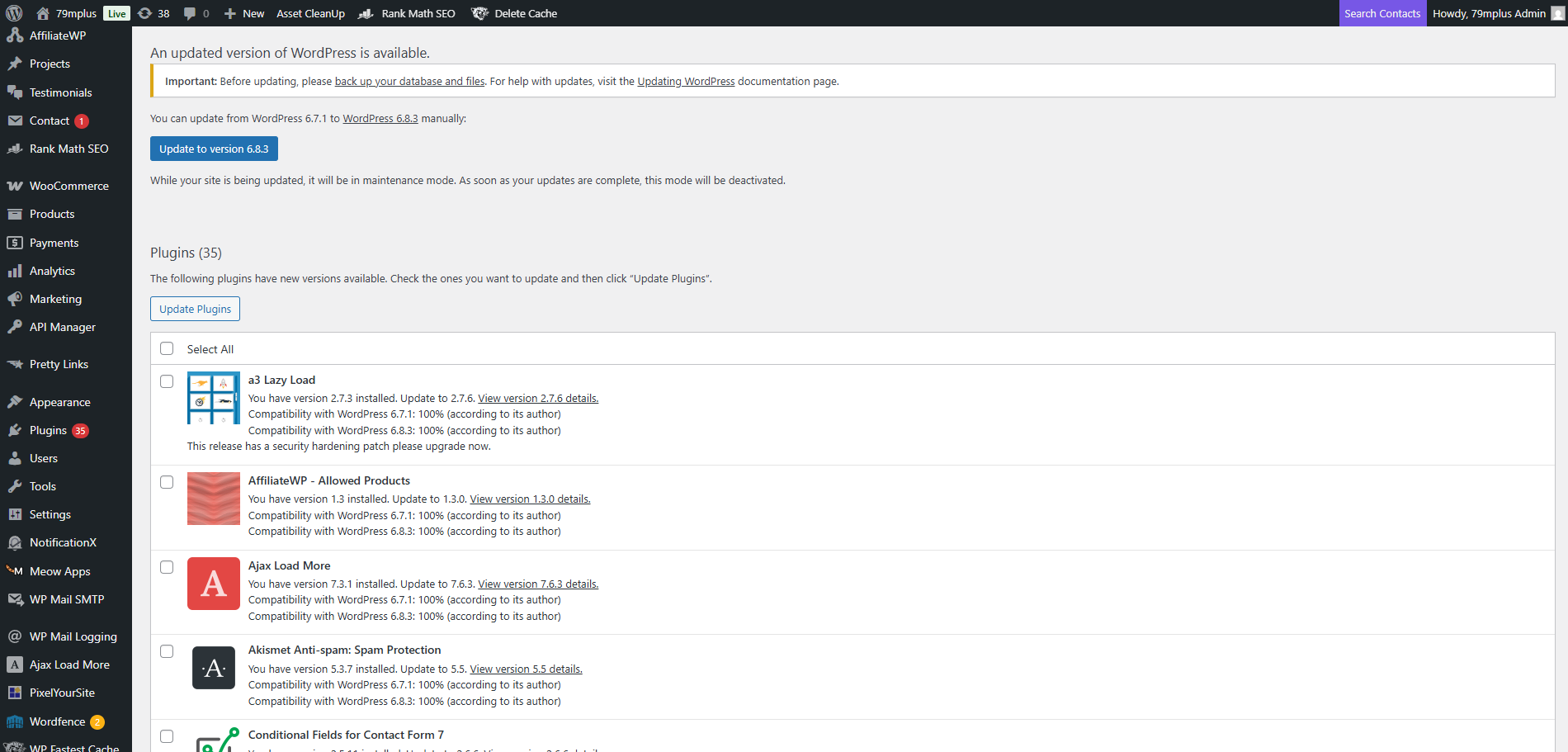
SEO is not a “set it and forget it” task. To maintain your improve WordPress ranking and stay ahead of the competition, ongoing maintenance is essential.
1. Ongoing Content Updates (The Refresh)
Google highly favors content that is current and accurate. A content refresh is often more effective than writing a brand new post.
- Audit Regularly: Review your top-performing posts (via Google Analytics) every 6–12 months.
- Update the Date: Change the post’s publication date to the current day (e.g., changing 2024 to 2025 in the title/body).
- Add New Sections: Integrate new information, update statistics, refresh images, and add a section covering AI trends.
2. Plugin and Core Software Maintenance
Outdated WordPress core files, themes, or plugins create security vulnerabilities that can lead to malware infections. A compromised site will quickly be penalized and even de-indexed by Google.
- Schedule Checks: Dedicate time each week to update all software.
- Test After Updates: Ensure updates haven’t broken your theme or critical functionality.
- Remove Unused Plugins: Deactivate and delete any plugins you no longer use, as they create unnecessary security risks and code bloat.
3. Site Monitoring and Health Checks
Use Google Search Console daily or weekly to monitor for issues:
- Core Web Vitals: Check your site’s performance scores (LCP, FID, CLS).
- Coverage Issues: Ensure new pages are being indexed and no important pages have been dropped.
- Security Issues: Immediately address any warnings about malware or spam detected by Google.
SEO in the AI Search Era
As Google fully integrates SGE (Search Generative Experience) and AI-generated answers, the game changes. Your strategy must evolve to focus on Answer Engine Optimization (AEO).
The Shift from Keywords to Conversation
Traditional SEO focused on typing keywords. AI search focuses on natural language, complex questions, and voice search (e.g., “Hey Google, what’s the best way to speed up my WordPress site?”).
How to Future-Proof Your WordPress SEO
- Embrace Structured Data (Schema): This is the foundation of AEO. Use HowTo schema for tutorials, FAQ schema for Q&A, and Review schema for product roundups. This directly feeds AI models the exact information they need to generate a summary answer.
- Use Conversational Content: Write in a direct, answer-focused style. When answering an AEO phrase like “How can I improve my WordPress SEO in 2025?”, provide the direct answer early on, followed by the supporting details.
- Focus on Specificity and Accuracy: AI requires high confidence. Ensure your data is hyper-accurate, verifiable, and sourced from authoritative places (E-E-A-T).
- Optimize for Voice Search Snippets: Many AI-generated answers are pulled from the same place as voice search snippets. Write concise, single-paragraph answers that directly address common user questions.
Final Thoughts
Mastering WordPress SEO in 2025 requires a holistic approach that blends solid technical foundations, high-quality, user-focused content, and an awareness of the shifting AI landscape.
It may seem overwhelming at first, but remember: consistency is key. You don’t have to overhaul your entire site in a day. Instead, focus on applying one area of improvement at a time, start with an SEO plugin, then optimize your titles, and finally, dedicate time to content depth.
By following this step-by-step beginner’s guide, you are building a sustainable strategy that will attract high-quality organic traffic, boost your WordPress ranking, and future-proof your website for years to come.