
Artificial intelligence is quickly becoming a core part of how modern websites are built and managed. WordPress, which powers a massive portion of the internet, is evolving right alongside this technology. We are finally moving beyond the early days of basic AI content generation. Today, AI-powered WordPress websites can handle customer support, personalize user experiences, automate tedious tasks, and analyze visitor behavior.
This shift matters to website owners because it changes what a standard business website can achieve on a daily basis. However, the rapid pace of change has also created a lot of confusing hype. In this article, you will learn exactly how AI is changing WordPress in 2026. We will look at what the technology can actually do, what plugins are leading the way, and where human expertise is still required.
Table of Contents
What Is an AI-Powered WordPress Website?
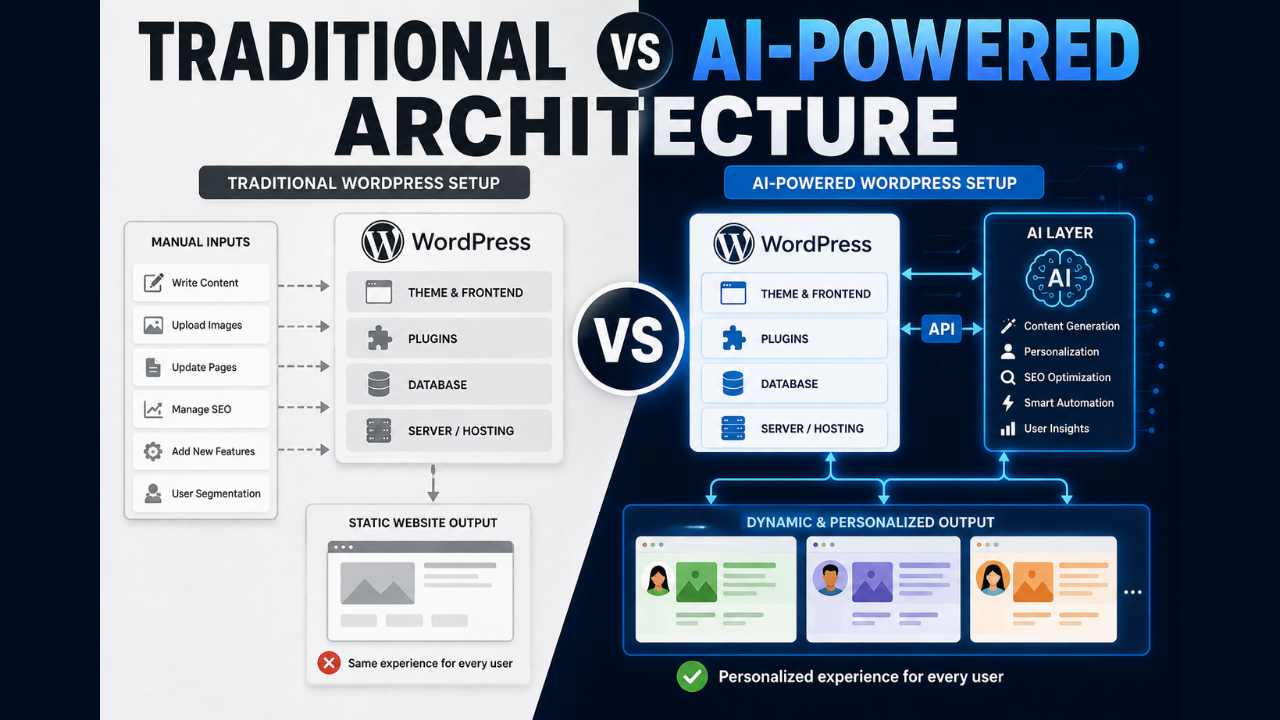
An AI-powered WordPress website is simply a standard WordPress site that uses artificial intelligence to handle specific tasks. Adding AI to your website does not mean replacing the familiar WordPress dashboard or changing your entire content management system. Instead, it means integrating smart tools via APIs or plugins that work behind the scenes.
A traditional WordPress website relies entirely on manual inputs from site owners and static interactions from visitors. If you want to recommend a product, update a page, or answer a customer question, a human must configure the system to do it. An AI-powered WordPress website, on the other hand, can respond dynamically to real-time data.
For example, an AI chatbot can read your entire knowledge base and instantly answer a specific customer question accurately. An automated workflow can detect a form submission, analyze the customer’s sentiment, and route the lead to the correct sales representative. AI acts as a productivity multiplier that layers on top of your existing WordPress foundation.
8 Ways AI Is Changing WordPress Websites
The integration of artificial intelligence is transforming several key areas of website management. Here are the 8 most meaningful AI-driven changes in the 2026 WordPress ecosystem.
1. AI-Powered Customer Support and Chatbots
What Is Changing?
Basic chatbots that force users through rigid, frustrating menus are being replaced. AI chatbots can now understand natural language, interpret context, and provide conversational answers.
How It Works
These tools connect to Large Language Models (LLMs) via APIs. You train the chatbot on your own WordPress content, such as blog posts, WooCommerce product pages, and support documents. When a visitor asks a question, the AI generates a unique, accurate answer based entirely on your approved data.
WordPress Example
A visitor on a hardware store website asks, “Which of these drills is best for masonry work?” The chatbot analyzes the site’s product database and instantly replies with specific product recommendations and links.
Who Benefits?
Small business owners, marketing agencies, and WooCommerce store owners benefit immensely. They can provide 24/7 support without hiring a massive customer service team.
Limitations
AI chatbots can sometimes misunderstand highly nuanced or emotional complaints. They also require careful initial training to prevent them from sharing incorrect information or making up answers (hallucinations).
Should You Use It?
If your business receives a high volume of repetitive customer questions, yes. If you sell highly regulated services that require strict legal compliance in every interaction, proceed with caution and human oversight.
2. Personalized Website Experiences
What Is Changing?
Websites are moving away from showing the exact same static content to every single visitor. AI website personalization allows WordPress to dynamically change text, layouts, and offers based on user behavior.
How It Works
AI tools track a visitor’s location, browsing history, referral source, and on-site behavior. The AI then instantly swaps out designated content blocks on your WordPress page to match the visitor’s presumed intent.
WordPress Example
A returning visitor who previously read articles about “dog training” visits a pet supply website. The homepage dynamically updates its main banner to show premium dog training treats instead of generic cat food.
Who Benefits?
Ecommerce stores, digital publishers, and B2B companies looking to improve conversion rates. Personalization helps users find what they are looking for much faster.
Limitations
Highly personalized experiences require collecting user data, which can trigger privacy concerns. If the AI incorrectly guesses the user’s intent, the personalization can feel confusing or intrusive.
Should You Use It?
Yes, but start small. Begin by personalizing specific landing pages for different marketing campaigns rather than trying to personalize the entire website at once.
3. Bulk Content Creation and Optimization
What Is Changing?
Updating hundreds of pages or writing repetitive content is no longer a purely manual process. AI tools can now bulk-update metadata, custom fields, and product descriptions directly inside the WordPress database.
How It Works
Using an AI automation plugin, administrators can set up a prompt that applies to specific post types. The AI runs through the selected pages in the background, reading the existing content and generating new text to fill in missing gaps or update outdated formatting.
WordPress Example
A WooCommerce store owner uses an AI plugin to rewrite 500 boring product descriptions. The AI takes the existing product titles, prices, and bullet points, and generates engaging, SEO-friendly paragraphs for every single item in minutes.
Who Benefits?
SEO agencies, bloggers with massive archives, and ecommerce managers. It saves dozens of hours of manual data entry and repetitive writing.
Limitations
AI can sometimes generate repetitive or generic-sounding text if the prompts are not highly specific. Bulk updating without reviewing the output can lead to embarrassing mistakes across your entire site.
Should You Use It?
Yes, for structured data like meta descriptions, alt text, and short product summaries. However, you should still rely on human writers for thought leadership and opinion-based blog posts.
4. AI-Assisted WooCommerce Shopping
What Is Changing?
The standard ecommerce shopping experience is becoming much more interactive and predictive. AI-powered WooCommerce features act more like a digital sales assistant than a static catalog.
How It Works
AI algorithms analyze sales data, search queries, and inventory levels in real time. They use this data to power smart search bars that tolerate typos, predict what a user wants to buy next, and offer dynamic bundle discounts.
WordPress Example
A customer adds a camera to their WooCommerce cart. The AI instantly analyzes past purchase data and offers a one-click upsell for a specific memory card and carrying case at a bundled discount.
Who Benefits?
Any WooCommerce store owner looking to increase their average order value. Customers also benefit from discovering relevant products they actually need without searching manually.
Limitations
Predictive recommendations require a decent amount of existing traffic and sales data to become accurate. Small stores with low traffic might not see immediate benefits from complex recommendation engines.
Should You Use It?
Absolutely. Adding smart product recommendations is one of the fastest ways to see a return on investment when implementing AI on an ecommerce site.
5. Automated Website Workflows
What Is Changing?
Routine website maintenance and data routing tasks are being handed over to AI. This drastically reduces the busywork required to keep a WordPress site functioning smoothly.
How It Works
Plugins like Uncanny Automator connect different tools on your website using “trigger and action” recipes. When combined with AI, these workflows can make complex decisions. The AI acts as a middleman that analyzes data before passing it to the next step.
WordPress Example
A user submits a long feedback form on your site. The automation tool sends the text to an AI, which reads it, determines the user is frustrated, and immediately creates a high-priority support ticket in your CRM.
Who Benefits?
Business decision-makers, site administrators, and marketing teams. Automation reduces overhead costs and ensures that important user interactions do not slip through the cracks.
Limitations
Complex workflows can be difficult to set up and troubleshoot if something goes wrong. If an API connection breaks, the entire automated process can fail without you realizing it.
Should You Use It?
Yes. Automating repetitive data entry and routing tasks is one of the most practical and reliable ways to use AI in WordPress today.
If you need help building reliable automated systems, custom WordPress development and integration are core specialties at 79mplus. We help businesses connect their tools seamlessly.
6. AI-Assisted SEO and Semantic Structure
What Is Changing?
Search Engine Optimization in WordPress is shifting away from simple keyword counting. AI tools are helping site owners focus on semantic relevance, search intent, and proper technical structure.
How It Works
AI SEO plugins analyze the top-ranking pages for your target topic. They provide real-time suggestions as you type in the WordPress editor, advising you on headings, entity usage, and readability. They also automate technical tasks like schema markup generation.
WordPress Example
While writing an article about “roof repair,” the AI SEO plugin suggests adding a specific FAQ section about “average repair costs” because it detected that searchers highly value this information.
Who Benefits?
Content creators, marketing agencies, and freelancers. AI simplifies complex SEO requirements, making it easier for non-technical users to compete in search rankings.
Limitations
AI SEO tools can sometimes encourage “over-optimization,” resulting in content that reads awkwardly to humans. They cannot replace the need for acquiring genuine backlinks or providing original insights.
Should You Use It?
Yes, use AI SEO tools as a structural guide. However, remember that Google prioritizes genuinely helpful human experiences, so do not blindly accept every AI suggestion.
7. AI-Powered Lead Qualification
What Is Changing?
Static contact forms are evolving into interactive, intelligent qualification systems. AI in WordPress can now vet potential clients before a human sales representative ever speaks to them.
How It Works
Instead of a standard form, users interact with a dynamic AI interface. The AI asks probing questions based on the user’s previous answers, scoring the lead based on budget, timeline, and industry criteria configured by the business.
WordPress Example
A visitor requests a quote for web design. The AI asks about their budget. When the visitor replies with a low number, the AI politely directs them to pre-made templates instead of scheduling a call with a senior consultant.
Who Benefits?
Service-based businesses, B2B companies, and sales teams. It prevents staff from wasting time on unqualified leads or spam inquiries.
Limitations
Some users simply dislike interacting with bots and may abandon the process if they cannot reach a human quickly. The AI must be carefully tuned to avoid turning away good prospects due to a misunderstanding.
Should You Use It?
Yes, if you have more leads than your team can handle. If you are a new business desperate for every possible lead, stick to traditional forms until your volume increases.
8. Predictive Analytics and Business Insights
What Is Changing?
Website owners no longer have to manually dig through endless charts to understand what is happening on their site. AI tools now analyze WordPress analytics and provide plain-language insights.
How It Works
AI analytics plugins connect to your WordPress database and tools like Google Analytics. They scan traffic patterns, user behavior, and sales velocity. The AI then generates written reports highlighting anomalies or opportunities.
WordPress Example
Instead of looking at a complex spreadsheet, a business owner receives a dashboard alert saying: “Traffic to your pricing page dropped 20% this week, likely due to slow page load times on mobile devices.”
Who Benefits?
Entrepreneurs and small business owners who do not have the time or expertise to analyze complex data sets manually.
Limitations
AI insights are only as good as the data being collected. If your tracking pixels or ecommerce analytics are configured incorrectly, the AI will give you bad advice.
Should You Use It?
Yes. Having AI highlight key trends allows you to make faster, data-driven decisions without needing a dedicated data scientist.
AI-Powered WordPress Plugins: What’s Possible Now?
The WordPress ecosystem is flooded with AI solutions, but the best tools fall into a few distinct categories. Here is a look at what is currently possible using top-tier WordPress AI plugins in 2026.
AI Chatbot Plugins
AI chatbots have matured significantly. Plugins in this category allow you to build custom support agents without knowing how to code.
-
Example Tool: AI Engine
-
What it does: Creates sophisticated chatbots that learn from your site’s content. It also features advanced MCP (Model Context Protocol) capabilities, meaning AI agents can actually manage parts of your site natively.
-
Best use case: Customer support automation and interactive user engagement.
-
Pricing: Free base version; Pro starts around $9.99/month, but you pay API providers directly for usage.
-
Limitations: Requires you to manage your own API keys (like OpenAI or Claude), which can be intimidating for beginners.
AI Content Tools
These plugins bring AI writing and editing directly into the WordPress Gutenberg editor, saving you from constantly switching tabs.
-
Example Tool: Jetpack AI Assistant
-
What it does: Generates text, lists, and tables based on prompts. It also provides adaptive tone adjustments and superior grammar correction right inside the editor.
-
Best use case: Speeding up the drafting process for blog posts and marketing copy.
-
Pricing: Currently around $4.95/month for the first year, with a limited 20-request free trial.
-
Limitations: It relies heavily on prompt quality. It is great for single content creation but not built for massive bulk updates.
AI SEO Tools
These plugins analyze your content as you write and offer smart suggestions to improve your search engine rankings.
-
Example Tool: Rank Math AI
-
What it does: Provides AI suggestions for SEO titles, optimizes content based on semantic keywords, and handles technical tasks like automated schema generation.
-
Best use case: Bloggers and content marketers wanting to improve on-page SEO effortlessly.
-
Pricing: Paid SEO plans generally start around $7.99/month, with Content AI credits sold separately.
-
Limitations: AI scoring can sometimes encourage keyword-stuffing if the user chases a perfect score rather than natural readability.
AI Automation Tools
Automation plugins connect your WordPress site to external apps and use AI to process data between them.
-
Example Tool: Uncanny Automator
-
What it does: Uses “trigger and action” recipes to connect plugins. It supports multi-LLM workflows, allowing AI to analyze form entries, generate images, or proofread text automatically.
-
Best use case: Connecting WooCommerce, CRMs, and e-learning plugins to streamline business operations.
-
Pricing: Starts around $149/year, with a generous free version available.
-
Limitations: Highly complex recipes can time out on restrictive hosting environments while waiting for an AI response.
AI and WooCommerce
Integrating AI into WooCommerce is fundamentally changing how digital storefronts operate. When executed well, AI makes ecommerce experiences highly personalized and far more efficient.
One major shift is in product recommendations. Traditional stores rely on manually curated “Related Products.” AI, however, analyzes a shopper’s browsing history and cart contents to predict exactly what they are most likely to buy next. This level of dynamic upselling helps boost average order values naturally without feeling pushy.
AI shopping assistants are also replacing static search bars. Instead of a customer struggling to find a specific product category, they can chat with an assistant. They might say, “I need a waterproof jacket for hiking under $100.” The AI will instantly search the WooCommerce database and return highly specific, personalized offers.
Customer behavior analysis is another massive benefit. AI tools can analyze shopping patterns to identify when customers are most likely to abandon their carts. Business owners can use these insights to optimize checkout flows or send perfectly timed, AI-generated recovery emails. To explore more about boosting sales, check out our guide on Best AI Chatbot for WooCommerce: How AI Chatbots Boost Conversions in 2026
AI + WordPress: What Still Requires Humans?
While AI is incredibly powerful, it is crucial to understand that it is a productivity multiplier, not a replacement for skilled professionals. Businesses still heavily rely on humans for strategic and complex decisions.
Here is why human oversight remains essential:
-
Strategy and Brand Decisions: AI does not understand the emotional core of your brand. Humans must define the company’s voice, target audience, and long-term business goals.
-
Complex Technical Architecture: While AI can generate code snippets, building secure, scalable custom plugins or integrating complex backend systems requires an experienced WordPress developer.
-
UX Decisions: AI can suggest layouts, but a human designer understands empathy, accessibility, and how a website actually feels to a user.
-
Quality Control: AI tools can confidently present incorrect information (hallucinations). Humans must review content to ensure technical accuracy and brand safety.
-
Business Judgment: You cannot automate common sense. Humans must decide when an AI tool is appropriate to use and when a personalized, human touch is required for a delicate customer interaction.
Potential Risks of AI-Powered WordPress Websites
Adding AI to your website introduces new challenges that must be managed carefully. Ignoring these risks can harm your brand reputation and your search engine rankings.
First, incorrect AI-generated information is a major risk. If your AI chatbot confidently gives a customer the wrong refund policy or technical spec, your business is still liable for that mistake. Always test your AI tools extensively and restrict them to your approved data sources.
Second, privacy and security concerns must be addressed. Sending customer data, such as form submissions or purchase history, to third-party AI platforms via APIs requires strict data protection policies. Always ensure your AI vendors comply with global privacy laws.
Finally, beware of over-automation and AI spam. Generating thousands of low-quality, AI-written blog posts will alienate your readers and potentially trigger search engine penalties. Similarly, if every interaction on your site feels robotic, users will leave. Keep the user experience natural, and use AI to enhance quality, not just quantity.
How to Add AI to an Existing WordPress Website
Adding AI just because it is trendy is a waste of time and money. To see real benefits, you must implement the technology thoughtfully. Here is a practical roadmap for adding AI to an existing WordPress setup.
Step 1: Identify a real business problem. Look for bottlenecks. Are you spending too much time answering basic support emails? Is your WooCommerce checkout conversion rate too low? Pinpoint a specific issue first.
Step 2: Choose the appropriate AI use case. Match the problem to a solution. If support is the issue, an AI chatbot is the answer. If product discovery is the issue, look into AI search and personalized recommendations.
Step 3: Choose a plugin, API, or custom integration. Evaluate the market. Can a standard tool like Jetpack AI or Uncanny Automator handle it, or do you need custom WordPress Performance Optimization and unique API integration?
Step 4: Test the implementation privately. Never deploy untested AI to your live users. Create a staging environment. Try to break the AI chatbot or find flaws in the automation workflow before launching.
Step 5: Measure the results. Once live, track the data. Is the AI actually saving you time? Are conversion rates improving? Keep an eye on your API costs to ensure the tool remains profitable.
Step 6: Improve based on real feedback. AI tools need constant tuning. Review customer interactions, update your knowledge base, and adjust your AI prompts based on how real users are engaging with the system.
How 79mplus Can Help Build Your AI-Powered Website
Implementing advanced AI on a business-critical website requires more than just installing a few free plugins. At 79mplus, we act as your technical implementation partner to turn your AI concepts into stable, working WordPress solutions.
We specialize in custom WordPress development and complex AI integrations tailored specifically to your business needs. Whether you need a sophisticated AI chatbot integration trained on your unique company data, or robust custom WordPress plugins to handle intricate backend development, our team has the hands-on expertise to deliver.
We don’t just add technology for the sake of it; we consult with you to build automated website workflows and WooCommerce customizations that actually drive revenue and save time. If you want to build an AI-powered architecture that is secure, fast, and scalable, we can help you integrate the right APIs and optimize your entire digital presence.
Frequently Asked Questions (FAQ)
What is an AI-powered WordPress website? It is a standard WordPress website that uses artificial intelligence tools—usually via plugins or API connections—to automate tasks, generate content, or personalize the visitor experience dynamically.
How can AI be added to WordPress? You can add AI to WordPress by installing dedicated AI plugins (like AI Engine or Jetpack AI), integrating external AI APIs (like OpenAI) into your code, or using automation platforms to connect WordPress with third-party AI tools.
Can AI automate WordPress tasks? Yes. Using tools like Uncanny Automator, AI can handle tasks such as analyzing form submissions, routing customer support tickets, translating text, and scheduling content updates based on specific triggers.
What are the best AI plugins for WordPress? The best plugin depends on your needs. For content generation, Jetpack AI Assistant is popular. For chatbots and dynamic site management, AI Engine is highly rated. For SEO, Rank Math AI is a top choice in 2026.
Is AI going to replace WordPress developers? No. While AI can write basic code snippets and assist with simple layouts, humans are essential for complex backend development, security architecture, UX strategy, and ensuring quality control.
Conclusion
Artificial intelligence is rapidly changing how WordPress websites are built, managed, and experienced. From AI-assisted WooCommerce shopping to automated business workflows, the technology is moving far beyond basic content generation. However, it is vital to remember that not every website needs every single AI feature.
The most successful AI-powered WordPress websites are those that use the technology to solve specific business problems while maintaining a high-quality user experience. Human strategy, brand oversight, and technical expertise remain just as important as ever.
If you are ready to modernize your business but aren’t sure where to start, you don’t have to navigate this transition alone. For expert guidance on custom WordPress development, tailored AI integrations, and backend automation, reach out to the team at 79mplus to start building your intelligent digital future.